Orange Money
Overview
Mastercard Gateway integrates with Cellulant to enable merchants to accept mobile money wallets in supported African markets. Merchants can offer local wallet options with other supported payment methods. Cellulant routes each request to the applicable wallet provider. The wallet provider authenticates the payer and authorizes the payment.
The integration supports these wallet types:
- Airtel Money
- MTN Mobile Money
- Orange Money
- M-Pesa
Prerequisites
Complete these prerequisites before offering Orange Money through Mastercard Gateway:
- The merchant must onboard with an Acquirer or MSO (Merchant Service Organisation) that has completed the required commercial and contractual arrangements with Mastercard Gateway and Cellulant and is enabled to offer Orange Money in the target country.
- The merchant must complete the Acquirer or MSO’s onboarding, KYC or KYB, and compliance requirements. The Acquirer or MSO and Cellulant must then create a merchant profile and service on the Tingg platform and enable Orange Money for the merchant.
- The Acquirer or MSO must use the Cellulant-generated service code as the Service Provider Merchant ID (SP MID) and configure it on Orange Money's Merchant Acquirer Link in Mastercard Gateway Merchant Manager.
Tingg service and wallet configuration
Apply these configuration requirements:
- Create one Tingg service for each merchant.
- Enable Orange Money for that service.
- Configure the service’s unique Service Code on the merchant’s Orange Money Merchant Acquirer Link.
- Offer only the wallets enabled through the Mastercard Gateway and Cellulant integration, even if Tingg displays other payment methods.
Payment flow for mobile money wallet transactions
These are the stages of Orange Money transaction :
- The payer selects the required goods or services on the merchant’s application or website and proceeds to the checkout.
- At checkout, the payer reviews the order, provides any required information, and selects the Orange Money to pay.
- The payer is redirected to the payment page and enters the mobile number linked to the Orange Money wallet.
- The payer authorizes the payment through the wallet application and is then redirected to the merchant’s application or website.
- The merchant displays the final payment status and any relevant transaction details on the return page.
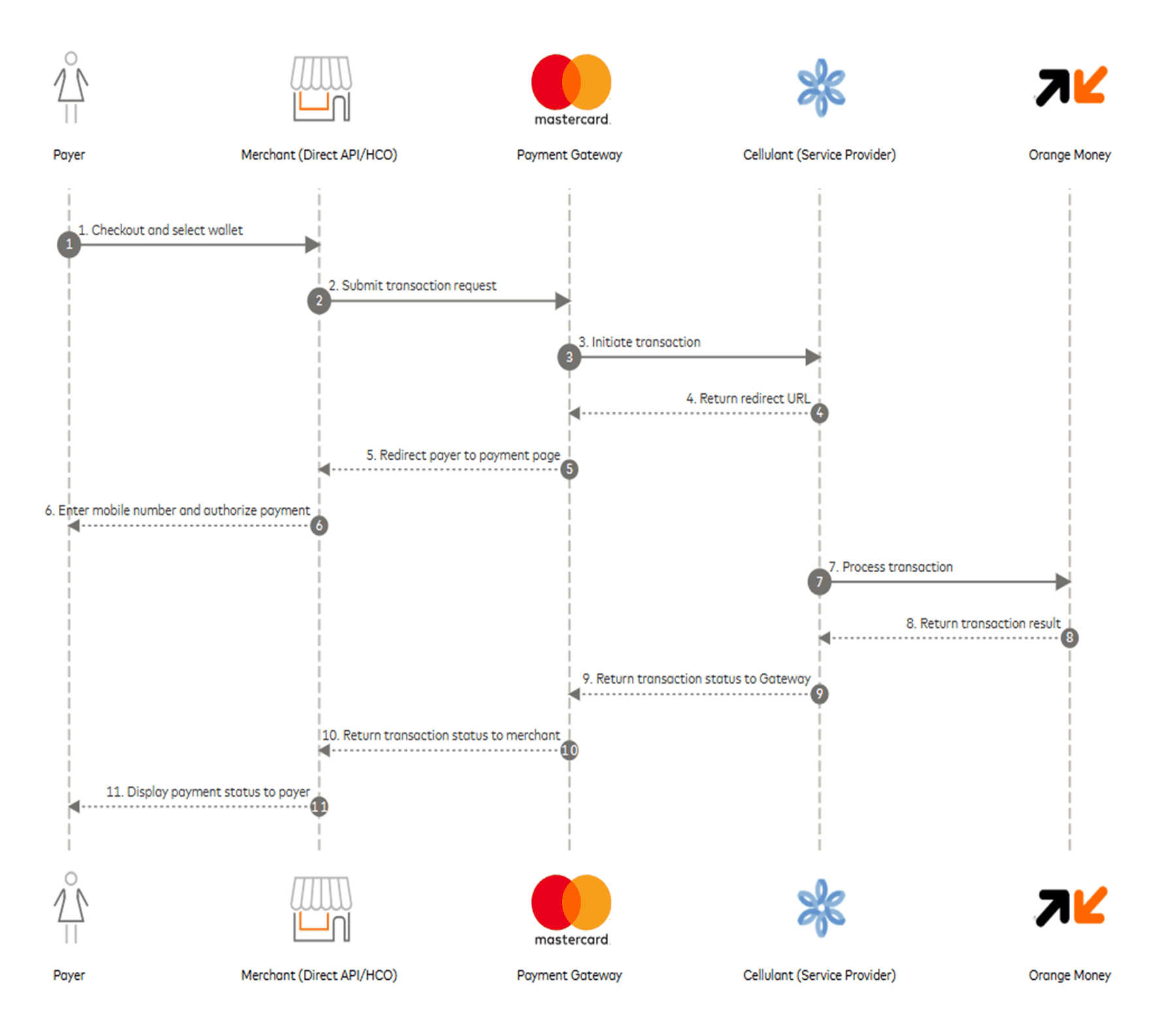
This diagram shows the interactions among the payer, merchant, gateway, Cellulant, and Orange Money during a payment.
Integration process
Integration methods
After completing the prerequisites in the Prerequisites section, a merchant can enable Orange Money through Hosted Checkout or the Direct API. New merchants must use Gateway API version 100.
- Hosted Checkout: Use the Gateway-hosted checkout experience. Once the merchant and Orange Money wallet are configured, the wallet is displayed at checkout with minimal merchant-side changes.
- Direct API: Integrate server-to-server with Gateway APIs to control the checkout experience, initiate the browser-payment flow, redirect the payer to the wallet experience, and retrieve the final transaction result.
Merchants not yet connected to Mastercard Gateway should refer to the Integration Types section in the Gateway API documentation to establish connectivity and exchange API requests and responses. They should then validate the integration in the test environment, including Payment Options Inquiry, payment initiation, final-status retrieval, and supported full or partial refunds. Existing Gateway integrations can be extended to enable Orange Money without any additional setup.
Initiate a payment through Direct API integration
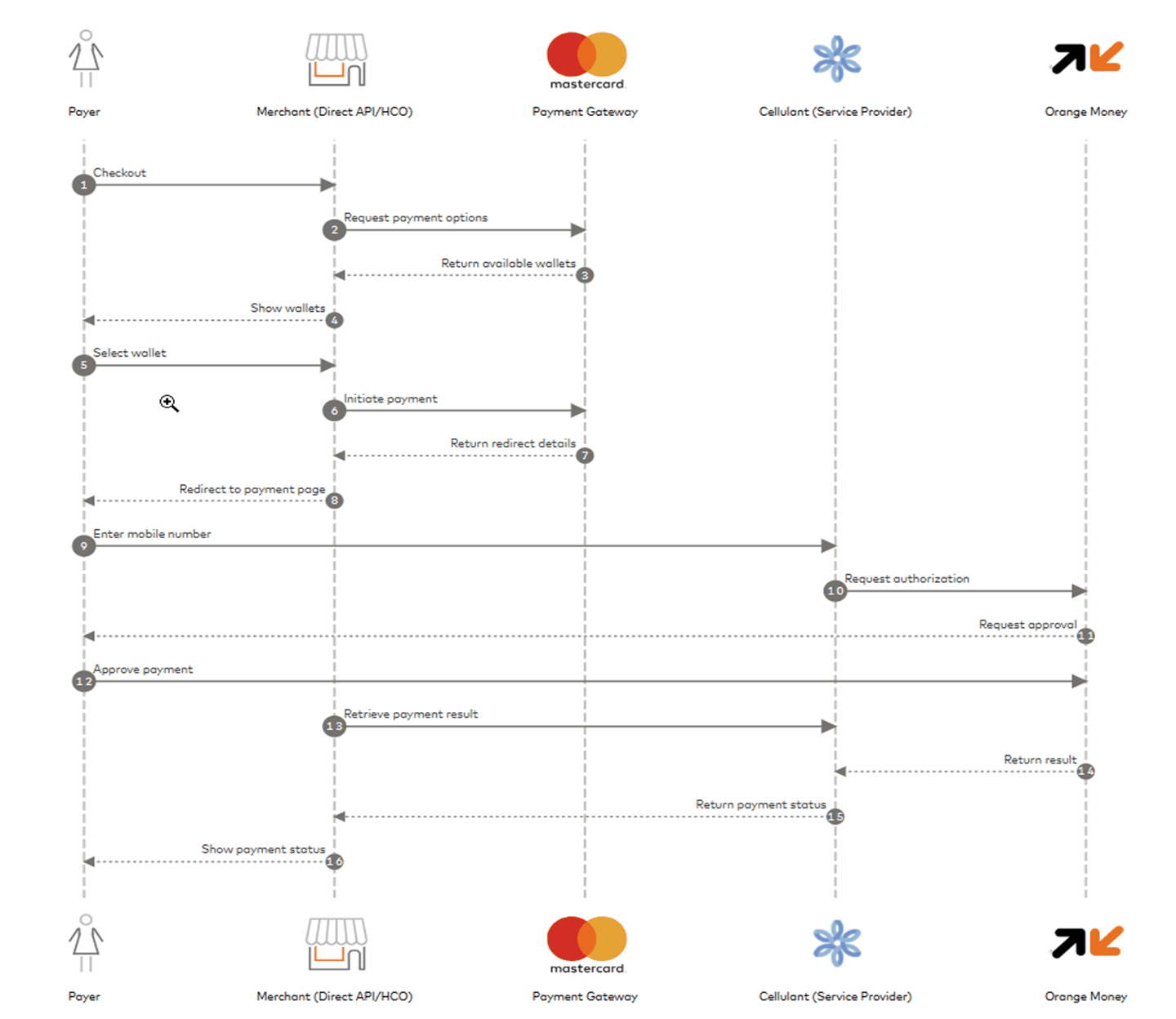
This diagram shows the Direct API payment flow for Orange Money wallet transaction:
To accept Orange Money payments through the Direct API, the merchant needs to complete some or all the following steps for each transaction:
Payment option inquiry
Send a Payment Options Inquiry API request to the gateway when the payer reaches checkout, to retrieve the payment methods available for the transaction and display them to the payer.
The Payment Options Inquiry response provides:
- Details of each available payment method, including its display name, logo, description, and supported countries and currencies.
- Standard and additional payer-data fields, such as the payer’s name, email address, phone number, and national ID. All fields marked as mandatory must be included in the Initiate Browser Payment request. Otherwise, the Gateway rejects the transaction because of a validation error.
- The operations supported by payment methods. Orange Money supports PAY and REFUND operations.
curl --request POST \
  --url "https://{gatewayhost}/api/rest/version/{version}/merchant/{mid}/paymentOptionsInquiry" \
  --header 'Authorization: Basic <base64 encoded merchant_id:api_password>'
{
  "merchant": "<gateway_merchant_id>",
  "paymentTypes": {
    "browserPayment": [
      {
        "currencies": [
          {
            "currency": "GHS"
          }
        ],
        "description": "Mobile Money",
        "displayName": "Orange Ghana",
        "logoUrl": "<url to the logo of the payment method>",
        "maxAmount": 5000,
        "minAmount": 1,
        "standardPayerData": [
          {
            "fieldName": "PHONE",
            "presence": "MANDATORY"
          },
          {
            "fieldName": "FIRST_NAME",
            "presence": "MANDATORY"
          },
          {
            "fieldName": "LAST_NAME",
            "presence": "MANDATORY"
          },
          {
            "fieldName": "EMAIL",
            "presence": "MANDATORY"
          }
        ],
        "supportedCountries": [
          {
            "country": "GHA"
          }
        ],
        "type": "ORANGE_MONEY"
      }
    ]
  },
  "result": "SUCCESS",
  "supportedPaymentOperations": [
    {
      "supportedPaymentOperation": "PURCHASE"
    }
  ]
}
Initiate a browser payment
After receiving the Payment Options Inquiry response and the payer selecting one of the available mobile wallets, the merchant needs to send an Initiate Browser Payment API request to the Gateway. The request initiates the transaction and provides the required order, billing, shipping, and payer information. The Gateway then returns the redirect information needed to send the payer to the payment page.
This table describes the required fields in an Initiate Browser Payment request:
| Field | Purpose | Example |
|---|---|---|
| apiOperation | Operation requested from the Gateway. | INITIATE_BROWSER_PAYMENT |
| order.amount | Payment amount. | 10.00 |
| order.currency | Currency enabled for Orange Money wallet. | GHS |
| sourceOfFunds.type | Identifies the source of funds as a browser payment. | BROWSER_PAYMENT |
| sourceOfFunds.browserPayment.type | Identifier of the wallet selected by the payer. |
|
| browserPayment.operation | Transaction operation to perform. | PAY |
| browserPayment.returnUrl | HTTPS URL to which the payer is returned after completing the wallet interaction. | https://merchant.example/payments/return |
curl --request POST \
  --url "https://{gatewayhost}/api/rest/version/{version}/merchant/{mid}/order/{{order_id}}/transaction/{{transaction_id}}" \
  --header 'Authorization: Basic <base64 encoded merchant_id:api_password>' \
  --header 'Content-Type: application/json' \
  --data '{
    "apiOperation": "INITIATE_BROWSER_PAYMENT",
    "billing": {
      "address": {
        "city": "Edinburgh",
        "company": "ABC",
        "country": "GBR",
        "stateProvince": "Scotland",
        "postcodeZip": "2000",
        "street": "OceanPoint",
        "street2": "OceanDrive"
      }
    },
    "shipping": {
      "address": {
        "city": "Edinburgh",
        "company": "ABC",
        "country": "GBR",
        "stateProvince": "Scotland",
        "postcodeZip": "2000",
        "street": "OceanPoint",
        "street2": "OceanDrive"
      }
    },
    "browserPayment": {
      "operation": "PAY",
      "returnUrl": "<The merchant app/website URL to redirect the user back to>"
    },
    "customer": {
      "account": {
        "id": "customerAccount"
      },
      "dateOfBirth": "YYYY-MM-DD",
      "email": "johnxxoe@maxxxxd.com",
      "firstName": "John",
      "lastName": "Doe",
      "mobilePhone": "073xxxxx53",
      "nationalId": "nationalId1",
      "phone": "+93xxxxxx33"
    },
    "order": {
      "reference": "TEST-SUCCEED",
      "amount": "20",
      "currency": "GHS",
      "description": "apmspi test order"
    },
    "sourceOfFunds": {
      "browserPayment": {
        "type": "ORANGE_MONEY"
      },
      "type": "BROWSER_PAYMENT"
    }
  }'
{
  "billing": {
    "address": {
      "city": "Edinburgh",
      "company": "ABC",
      "country": "GBR",
      "postcodeZip": "2000",
      "stateProvince": "Scotland",
      "street": "OceanPoint",
      "street2": "OceanDrive"
    }
  },
  "browserPayment": {
    "interaction": {
      "status": "INITIATED",
      "timeInitiated": "2026-04-17T09:36:12.613Z"
    },
    "operation": "PAY",
    "redirectHtml": "<HTML content to redirect the payer to the payment page>",
    "returnUrl": "<The merchant app/website URL to redirect the user back to>"
  },
  "customer": {
    "account": {
      "id": "customerAccount"
    },
      "email": "johnxxoe@maxxxxd.com",
      "firstName": "John",
      "lastName": "Doe",
      "mobilePhone": "073xxxxx53",
      "nationalId": "nationalId1",
      "phone": "+93xxxxxx33"
    },
  },
  "gatewayEntryPoint": "WEB_SERVICES_API",
  "merchant": "<Gateway Merchant ID>",
  "order": {
    "amount": 20,
    "chargeback": {
      "amount": 0,
      "currency": "GHS"
    },
    "creationTime": "2026-04-17T09:36:12.551Z",
    "currency": "GHS",
    "description": "apmspi test order",
    "id": "6315883051",
    "lastUpdatedTime": "2026-04-17T09:36:13.080Z",
    "merchantAmount": 20,
    "merchantCurrency": "GHS",
    "reference": "TEST-SUCCEED",
    "status": "INITIATED",
    "totalAuthorizedAmount": 0,
    "totalCapturedAmount": 0,
    "totalDisbursedAmount": 0,
    "totalRefundedAmount": 0
  },
  "response": {
    "acquirerCode": "ACCEPTED",
    "gatewayCode": "SUBMITTED",
    "gatewayRecommendation": "NO_ACTION"
  },
  "result": "SUCCESS",
  "shipping": {
    "address": {
      "city": "Edinburgh",
      "company": "ABC",
      "country": "GBR",
      "postcodeZip": "2000",
      "stateProvince": "Scotland",
      "street": "OceanPoint",
      "street2": "OceanDrive"
    }
  },
  "sourceOfFunds": {
    "browserPayment": {
      "type": "ORANGE_MONEY"
    },
    "type": "BROWSER_PAYMENT"
  },
  "timeOfLastUpdate": "2026-04-17T09:36:13.080Z",
  "timeOfRecord": "2026-04-17T09:36:12.611Z",
  "transaction": {
    "acquirer": {
      "id": "<acquirer_link_id>",
      "merchantId": "<Service Code of the Merchant on the Tingg Portal>"
    },
    "amount": 20,
    "currency": "GHS",
    "id": "5089118823",
    "source": "INTERNET",
    "stan": "0",
    "type": "PAYMENT"
  },
  "version": "100"
}
Redirect the payer to the Cellulant-hosted page
Complete these steps to redirect the payer and obtain payment authorization:
- Use the browserPayment.redirectHtml field from the Initiate Browser Payment response to redirect the payer’s browser to the Cellulant-hosted page.
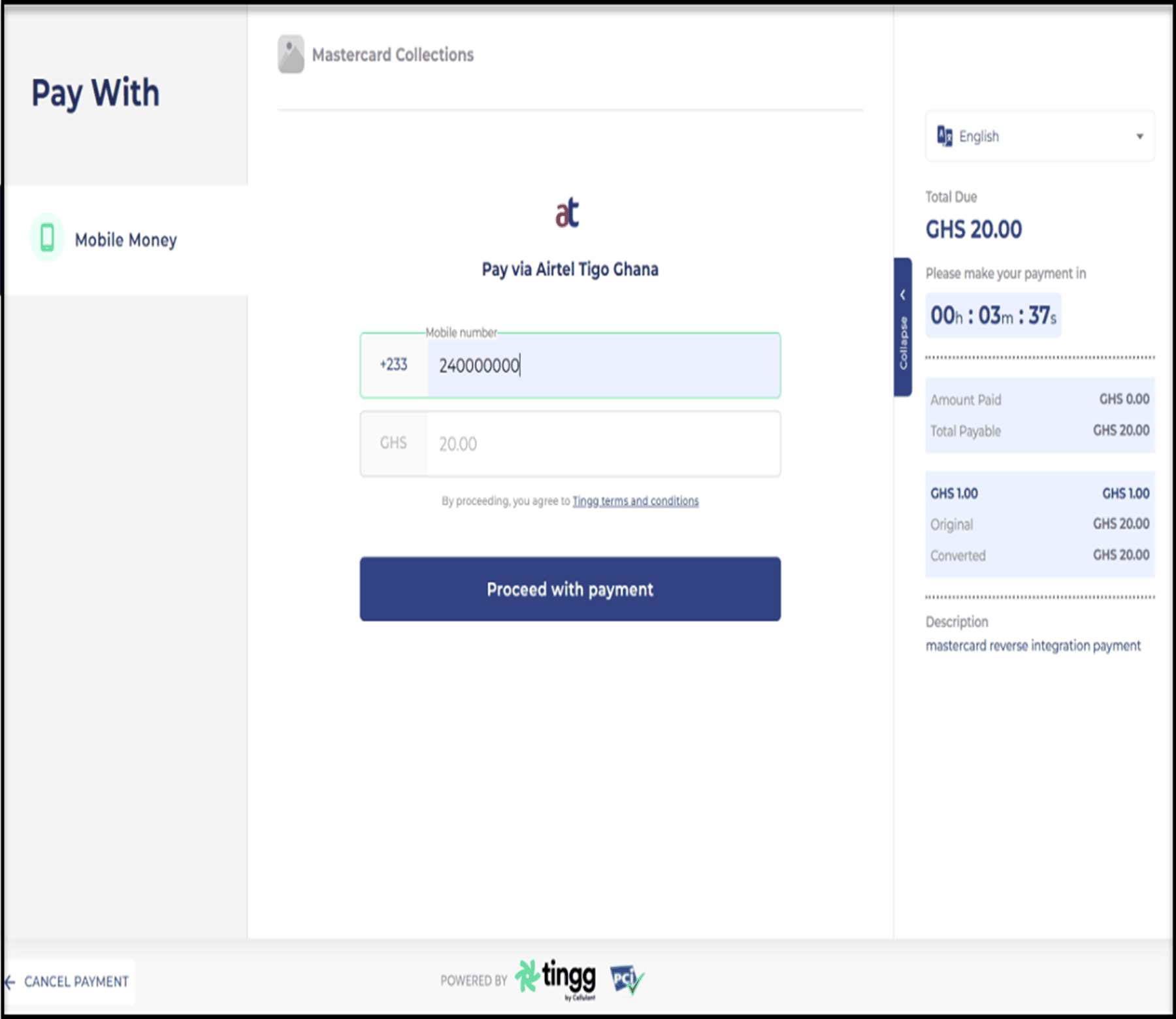
- The payer enters and submits the mobile number linked to the Orange Money wallet.
- The payer authorizes the payment request in the wallet application.
This image shows the page where the payer enters the mobile number linked to the Orange Money wallet.
Return the payer to the merchant application or website
After the payer completes the interaction on the Cellulant-hosted page, Cellulant redirects the payer’s browser to the merchant’s application or website using the browserPayment.returnUrl provided in the Initiate Browser Payment request. The merchant must use the information in the return URL to identify the order.
If the payer’s browser does not return within the expected time, perform a Retrieve Transaction operation to determine the interaction status and whether the payment was successful.
Retrieve the transaction result
After the payer’s browser returns to the merchant application or website, use the Retrieve Order or Retrieve Transaction operation to confirm the payment result. Use this information to display the transaction result to the payer.
curl --request GET \
  --url "https://{gatewayhost}/api/rest/version/{version}/merchant/{mid}/order/{{order_id}}" \
  --header 'Authorization: Basic <base64 encoded merchant_id:api_password>'
{
  "amount": 20,
  "billing": {
    "address": {
      "city": "Edinburgh",
      "company": "ABC",
      "country": "GBR",
      "postcodeZip": "2000",
      "stateProvince": "Scotland",
      "street": "OceanPoint",
      "street2": "OceanDrive"
    }
  },
  "chargeback": {
    "amount": 0,
    "currency": "GHS"
  },
  "creationTime": "2026-04-17T09:36:12.551Z",
  "currency": "GHS",
  "customer": {
    "account": {
      "id": "customerAccount"
    },
      "email": "johnxxoe@maxxxxd.com",
      "firstName": "John",
      "lastName": "Doe",
      "mobilePhone": "073xxxxx53",
      "nationalId": "nationalId1",
      "phone": "+93xxxxxx33"
    },
  },
  "description": "apmspi test order",
  "id": "6315883051",
  "lastUpdatedTime": "2026-04-17T09:38:35.963Z",
  "merchant": "CELLU_MER1",
  "merchantAmount": 20,
  "merchantCurrency": "GHS",
  "reference": "TEST-SUCCEED",
  "result": "SUCCESS",
  "shipping": {
    "address": {
      "city": "Edinburgh",
      "company": "ABC",
      "country": "GBR",
      "postcodeZip": "2000",
      "stateProvince": "Scotland",
      "street": "OceanPoint",
      "street2": "OceanDrive"
    }
  },
  "sourceOfFunds": {
    "browserPayment": {
      "type": "ORANGE_MONEY"
    },
    "type": "BROWSER_PAYMENT"
  },
  "status": "CAPTURED",
  "totalAuthorizedAmount": 20,
  "totalCapturedAmount": 20,
  "totalDisbursedAmount": 0,
  "totalRefundedAmount": 0,
  "transaction": [
    {
      "billing": {
        "address": {
          "city": "Edinburgh",
          "company": "ABC",
          "country": "GBR",
          "postcodeZip": "2000",
          "stateProvince": "Scotland",
          "street": "OceanPoint",
          "street2": "OceanDrive"
        }
      },
      "browserPayment": {
        "interaction": {
          "status": "COMPLETED",
          "timeCompleted": "2026-04-17T09:38:35.952Z",
          "timeInitiated": "2026-04-17T09:36:12.613Z"
        },
        "operation": "PAY",
        "redirectHtml": "<Cellulant Redirect URL>",
        "returnUrl": "<Merchant Return URL>"
      },
      "customer": {
        "account": {
          "id": "customerAccount"
        },
      "email": "johnxxoe@maxxxxd.com",
      "firstName": "John",
      "lastName": "Doe",
      "mobilePhone": "073xxxxx53",
      "nationalId": "nationalId1",
      "phone": "+93xxxxxx33"
    },
      },
      "gatewayEntryPoint": "WEB_SERVICES_API",
      "merchant": "CELLU_MER1",
      "order": {
        "amount": 20,
        "chargeback": {
          "amount": 0,
          "currency": "GHS"
        },
        "creationTime": "2026-04-17T09:36:12.551Z",
        "currency": "GHS",
        "description": "apmspi test order",
        "id": "6315883051",
        "lastUpdatedTime": "2026-04-17T09:38:35.963Z",
        "merchantAmount": 20,
        "merchantCurrency": "GHS",
        "reference": "TEST-SUCCEED",
        "status": "CAPTURED",
        "totalAuthorizedAmount": 20,
        "totalCapturedAmount": 20,
        "totalDisbursedAmount": 0,
        "totalRefundedAmount": 0
      },
      "response": {
        "acquirerMessage": "Simulate payment",
        "gatewayCode": "APPROVED",
        "gatewayRecommendation": "NO_ACTION"
      },
      "result": "SUCCESS",
      "shipping": {
        "address": {
          "city": "Edinburgh",
          "company": "ABC",
          "country": "GBR",
          "postcodeZip": "2000",
          "stateProvince": "Scotland",
          "street": "OceanPoint",
          "street2": "OceanDrive"
        }
      },
      "sourceOfFunds": {
        "browserPayment": {
          "type": "ORANGE_MONEY"
        },
        "type": "BROWSER_PAYMENT"
      },
      "timeOfLastUpdate": "2026-04-17T09:38:35.963Z",
      "timeOfRecord": "2026-04-17T09:36:12.611Z",
      "transaction": {
        "acquirer": {
          "id": "<acquirer_link_id>",
          "merchantId": "<Tingg Portal generated Service Code>"
        },
        "amount": 20,
        "currency": "GHS",
        "id": "5089118823",
        "source": "INTERNET",
        "stan": "0",
        "type": "PAYMENT"
      },
      "version": "100"
    }
  ]
}
Initiate a refund through Direct API integration
After the gateway approves a transaction, the merchant can initiate a full or partial refund by using the original order ID. The merchant can initiate the refund through the Direct API or MA Portal.
curl --request PUT \
  --url "https://{gatewayhost}/api/rest/version/{version}/merchant/{mid}/order/{{order_id}}/transaction/{{transaction_id}}" \
  --header 'Authorization: Basic <base64 encoded merchant_id:api_password>' \
  --header 'Accept-Language: en-US' \
  --header 'Content-Type: application/json' \
  --data '{
    "apiOperation": "REFUND",
    "transaction": {
      "amount": "10",
      "currency": "GHS"
    }
  }'
{
  "browserPayment": {
    "interaction": {
      "status": "COMPLETED",
      "timeCompleted": "2026-04-23T14:17:52.952Z",
      "timeInitiated": "2026-04-23T14:15:29.613Z"
    },
    "operation": "PAY",
    "redirectHtml": "<HTML content to redirect the payer to the payment page>",
    "returnUrl": "<The merchant app/website URL to redirect the user back to>"
  },
  "customer": {
    "account": {
      "id": "customerAccount"
    },
    "email": "johnxxoe@maxxxxd.com",
    "mobilePhone": "073xxxxx53",
    },
  },
  "gatewayEntryPoint": "WEB_SERVICES_API",
  "merchant": "CELLU_MER1",
  "order": {
    "amount": 20,
    "chargeback": {
      "amount": 0,
      "currency": "GHS"
    },
    "creationTime": "2026-04-23T14:15:29.551Z",
    "currency": "GHS",
    "id": "6315883051",
    "lastUpdatedTime": "2026-04-23T18:42:11.027Z",
    "merchantAmount": 20,
    "merchantCurrency": "GHS",
    "reference": "TEST-SUCCEED",
    "status": "PARTIALLY_REFUNDED",
    "totalAuthorizedAmount": 20,
    "totalCapturedAmount": 20,
    "totalDisbursedAmount": 0,
    "totalRefundedAmount": 10
  },
  "response": {
    "acquirerCode": "APPROVED",
    "gatewayCode": "APPROVED"
  },
  "result": "SUCCESS",
  "sourceOfFunds": {
    "browserPayment": {
      "type": "ORANGE_MONEY"
    },
    "type": "BROWSER_PAYMENT"
  },
  "timeOfLastUpdate": "2026-04-23T18:42:11.027Z",
  "timeOfRecord": "2026-04-23T18:42:09.959Z",
  "transaction": {
    "acquirer": {
      "id": "<acquirer_link_id>",
      "merchantId": "<Service Code of the Merchant on the Tingg Portal>"
    },
    "amount": 10,
    "currency": "GHS",
    "id": "5089118824",
    "source": "INTERNET",
    "stan": "0",
    "type": "REFUND"
  },
  "version": "100"
}
Interpret the transaction result
These tables describe the transaction response codes returned after a payment is initiated:
| Initiate browser payment response | What this means |
|---|---|
response.gatewayCode = SUBMITTED result = SUCCESS |
Redirect the payer using the browserPayment.redirectHtml provided in the Initiate Browser Payment response. |
| Retrieve transaction or retrieve order response | What this means |
|---|---|
response.gatewayCode = APPROVED result = SUCCESS |
The payment is successful. |
response.gatewayCode = PENDING result = PENDING |
The Mastercard Gateway is waiting for confirmation from the acquirer. Retry the RETRIEVE_TRANSACTION operation or use webhook notifications. |
response.gatewayCode = CANCELLED result = FAILURE |
The payer cancelled the payment. Offer an alternative payment method. |
response.gatewayCode = DECLINED or ACQUIRER_SYSTEM_ERROR result = FAILURE |
The payment was declined. Offer the payer another payment method. For ACQUIRER_SYSTEM_ERROR, inquire with the acquirer or retry the RETRIEVE_TRANSACTION operation. |
response.gatewayCode = TIMED_OUT result = FAILURE |
Treat the payment as declined. |
Initiate a payment through Hosted Checkout
Hosted Checkout (HCO) provides a Gateway-hosted interface for collecting payment details and completing the payer interaction.
For API version 100 and later, mobile wallets supported via Cellulant become automatically available in Hosted Checkout after the merchant’s acquirer or MSO enables the payment method and configures the required merchant acquirer link on the merchant profile. Existing HCO integrations do not require a separate checkout integration for these wallets. Merchants that have not yet integrated with the Gateway should refer to Hosted Checkout under the Integration Types section of the Gateway API documentation for detailed HCO integration steps, including prerequisites, session creation, payment-page setup, and response handling.
Webhook notifications
If you subscribe to Mastercard Gateway Webhook Notifications, you receive additional notifications about the payment status.